Adding a Calendar Widget to BIRT
Introduction
BIRT does a very well job at asking users for input parameters — except in one area: dates. This article will explain how to add a graphical calendar widget so users can visually choose a date rather than typing one in.
Table of Contents
The Problem
Below is what the default input window looks like when asking a user for a date:
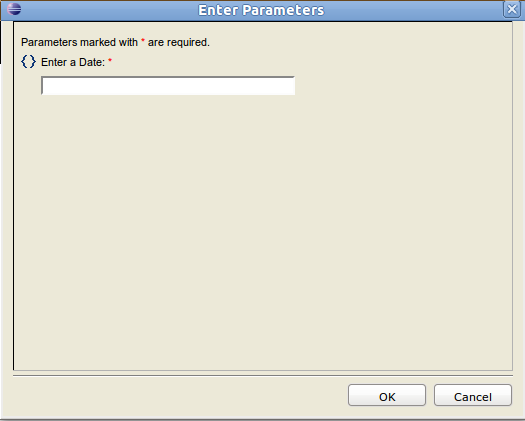
The main issue with this parameter is what format do I use? Is the date supposed to be 03/14/2011, 14/03/2011, 2011-03-14, March 14th, 2011?
It is possible to add a helper caption to tell the user “Format: YYYY-MM-DD“, but what if you forget to add the caption? Or the user just doesn’t read it?
The second issue is the work involved with typing the date in. What if your report requires more than one date? With each extra date field, the chances of your report failing due to typos increases.
The Solution
The solution to this problem is to add a calendar widget to the Report Parameters window that allows the user to graphically add a date. This solves both the format issue and the typing issue by turning typing into pointing and clicking. Of course there is still the issue with the user choosing the wrong date, but there’s nothing that can be done to fix that.
Requirements
The only requirement for this is JSCal2. I’m sure there are several other JavaScript calendar solutions available, but JSCal is what has been used in other solutions on the BIRT forums, so it’s what I stuck with. At the time of this writing, JSCal2 1.9 is the latest version.
Copy the JSCal2-1.9 folder to the birt/webcontent/birt directory. If you are making this modification to your Eclipse installation, the full path is:
eclipse/plugins/org.eclipse.birt.report.viewer_2.6.1.v20100913/birt/webcontent/birt.
If you are making the modification on the server, you can find the webcontent folder by doing:
# cd /path/to/birt/viewer # find . -name webcontent
Modifications
There are two files that need modified. The first is birt/webcontent/birt/pages/layout/FramesetFragment.jsp. After line 130, add the following:
The next file is birt/webcontent/birt/pages/parameter/TextBoxParameterFragment.jsp. For this file, add the following code before
</TD>
</TR>
at the end of the file:
<%
if (parameterBean.getParameter().getDataType()==7|| parameterBean.getParameter().getDataType()==4) {
%>
<%
}
%>
Using the Widget
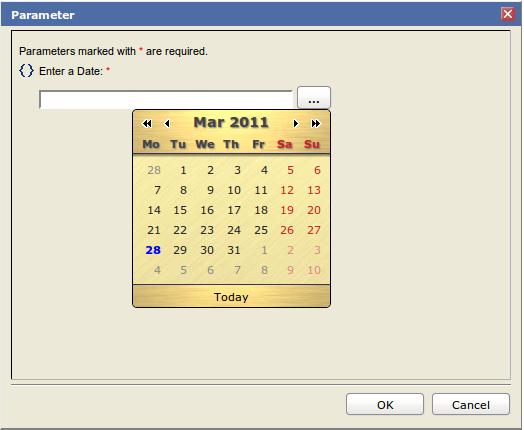
Those are the only changes needed. To test, either run a report that uses a date parameter on the server or via the Web Viewer in Eclipse. You should see a clickable button next to the parameter, and when clicked, a date widget will appear. It should looks something like this:
Conclusion
This article covered adding the ability to graphically pick a date with BIRT Reports. By doing so, the risk of a report failing to run are mitigated due to less issues with typos and misunderstanding about proper date input formats.


Julio Leiva said,
Hi I follow your steps But still I don’t see the calendar when I run the report via web viewer. I have the latest version of BIRT These are the places where I made the changes C:\eclipse\plugins org.eclipse.birt.report.viewer_2.6.2.r262_v20110214\birt\webcontent\birt\pages\layout\FramesetFragment.jsp and C:\eclipse\plugins\org.eclipse.birt.report.viewer_2.6.2.r262_v20110214\birt\webcontent\birt\pages\parameter\TextBoxParameterFragment.jsp
What else should I do? Thanks
a
jtopjian said,
I apologize — please check the updated code.
In the TextBoxParameterFragment.jsp file, I was using a custom calendar.gif image that is not included with JSCal nor BIRT and did not explain that in the text.
I have updated the article to reflect a simple HTML button.
Let me know if that helps.
Julio Leiva said,
Hi Joe That worked,however I had defined the date parameter as a string, after I changed it to date , works perfect Thanks a lot for this…….it is really helpful It only works with web viewer right? I also copied my report over our web service box Copied JSCAL to the webcontent directory Restarted tomcat, but still does not work Anything else to do on the server side?
Thanks again.
Joe Topjian said,
Server-side should be set up the exact same way. I actually had this working on the server first and then tried it on the web viewer.
I would recommend making sure that all of the JSCal files are accessible by your browser.
Julio Leiva said,
Hi Joe This is my tree directory on my server-side drwxr-xr-x 8 tomcat tomcat 384 Mar 29 14:24 . drwxr-xr-x 13 tomcat tomcat 560 Mar 25 11:47 .. -rwxr-xr-x 1 tomcat tomcat 1703 Mar 25 11:42 CancelTask.jsp drwxr-xr-x 6 tomcat tomcat 352 Mar 29 14:36 WEB-INF drwxr-xr-x 2 tomcat tomcat 48 Mar 29 15:05 documents -rwxr-xr-x 1 tomcat tomcat 3328 Mar 25 11:42 index.jsp drwxr-xr-x 2 tomcat tomcat 3160 Mar 30 09:16 logs drwxr-xr-x 3 tomcat tomcat 72 Mar 25 11:42 report -rw-r–r– 1 tomcat tomcat 111130 Mar 29 13:24 report1.rptdesign drwxr-xr-x 2 tomcat tomcat 80 Mar 25 11:42 scriptlib -rwxr-xr-x 1 tomcat tomcat 4772 Mar 25 11:42 test.rptdesign -rwxr-xr-x 1 tomcat tomcat 57161 Mar 25 11:42 test1.rptdesign drwxr-xr-x 4 tomcat tomcat 104 Mar 29 10:20 webcontent So I put the JSCal files under webcontent directory webservice:/birt/webcontent # drwxr-xr-x 4 tomcat tomcat 160 Mar 29 10:20 JSCal2-1.9 drwxr-xr-x 7 tomcat tomcat 176 Mar 30 09:14 birt
This is the J2Cal2-1.9.tree drwxr-xr-x 2 tomcat tomcat 328 Mar 29 10:20 demo -rw-r–r– 1 tomcat tomcat 173 Mar 29 10:20 demopage.css -rw-r–r– 1 tomcat tomcat 16875 Mar 29 10:20 index.html drwxr-xr-x 4 tomcat tomcat 96 Mar 29 10:20 src webservice:/birt/webcontent/JSCal2-1.9 #
As you can see tomcat has the rights to access it.
Thanks
Joe Topjian said,
Are you able to type in the address to the .css and .js files and view them in your browser?
Julio Leiva said,
HI Joe Yes http://webservice:8080/birt-viewer//webcontent/JSCal2-1.9/src/js/jscal2.js This what I see /** * ____ _____ * Dynarch Calendar — JSCal2, version 1.9 \ /_ / / * Built at 2011/03/13 10:28 GMT \ / / / * \/ /_ / * (c) Dynarch.com 2009 \ / / * All rights reserved. / / * Visit http://www.dynarch.com/projects/calendar for details \/ * */ Calendar=function(){function bm(a){typeof a==”string”&&(a=document.getElementById(a));return a}function bk(a,b,c){for(c=0;c<a.length;++c)b(a[c])}function bj
Thanks
Joe Topjian said,
OK, if you’re able to see the files from your browser, then the calendar should work.
I just ran through this procedure on a bare tomcat install I had on a VM. I copied and pasted the code above into the correct areas, downloaded JSCal2 to “/var/lib/tomcat5/webapps/birt/webcontent/birt”, unzipped, and the calendar showed up for me.
Julio Leiva said,
Hi Joe I got it working. I got confused , what happened was that I made the changes only on my windows box, then transfer the report to the server(linux box). But changes have to be made on both designer box and server box(tomcat).
Thanks…it is working like a charm
cdoniat said,
Hi Joe, I did that you propose with calendar. 1)In tomcat/birtViewer, I’ve got the calendar.gif which leads to nothing. How to hid it? 2)In Designer, I’ve got the button which doesn’t get any calendar. Any clue? Chrisotphe
Joe Topjian said,
Hello,
I would review the code blocks above and make sure your files match. As long as JSCal has been copied to the right location and is linked correctly and the extra code has been added to the right places, this will work.
Redro said,
Hi, Great it works for me while running report as web viewer, but unable to get this in PDF.
Rafael said,
Hi I follow your steps but still I don’t see the calendar button when I run the report via webview.
But I dont know why. On my test machine and other servers the calendar works perfect. Now I copy the birt runtime folder to a new system and the calandar dont works. I tried to update firefox and IE. I tried to set BIRT Home variable. I made changes in the configuration for java scripting and so on.
Maybe any idea?
Sapphie said,
Hi Joe
Thanks for this. I have tried it on BIRT 2.6.2 and it works OK for the running the reports via the web browser.
Is it supposed to also allow the calendar to pop up when previewing the report in the eclipse designer on my PC? I see the ‘…’ button but nothing happens when I click it. No real probs as i can manually enter dates but just wondering.
Lee
Sapphie said,
As a followup, I have discovered from another site that the calendar does show up when running from the designer if you select ‘View Report in Web Viewer’ option. So click the web viewer icon rather than the report’s Preview tab.
Lee
Joe Topjian said,
Hi Sapphie,
That’s correct. The Web Viewer utilizes a full web server that will properly render all elements whereas the Preview does not.
arun said,
Hi, I followed ur steps, but Calendar button is not displayed in Parameter selection page.plz help me
vishal said,
Hi Joe ,
Thanks a lot its working fine… steps were easily understandable.
Munna said,
Thank you a lot for this valuable tutorial.
HUGO said,
HI The use of the graphic calendar is very useful. I have read and follow the steps and it doesn’t work
could you send me the modified data and a detail more extend of what I have to do, I’m sure that all birt users will be glad.
thaks
HUGO said,
hi
i get success in the calendar aparison but the button appears at the top corner instead of the parameter right please how can i make the button appear where i want?
Thanks
Tunisienne said,
Thank you! it works well for me. But I have 2 questions and I hope you can help me 1/the new jscal supports time selection, I downloaded the updated code but I don’t see it in my calendar? 2/ How can I make conditions on the parameter selection. I mean how to prevent the selection of an end date before start date for example)
Thanks
Tunisienne said,
ehhh it’s me again: 1/I modified the jscal2.jsp (showTime()=true) and MyCalendar displays the time selection, but how to retrieve/get the result Date + Time on the string field?
Joe Topjian said,
I’m not exactly sure how you would get the time portion to work, but I would assume that the text field would have to contain a date and time string that were parsable by BIRT. If JSCal is able to be configured to customize how the selected date and time display in the text box, that’s probably the right direction.
Gromit said,
Hi it works well. I’ve only a problem with the date format. It’s possible to change to format from YYYY-MM-DD to DD.MM.YYYY?
thnaks
Gromit said,
So I fixed the “problem”. It was a special set-up in BIRT.
Waseem said,
Nice idea, I have implemented that. and found really helpful.
Rahul Chundawat said,
in a single try i added this calander to my application thanks
Scott Mead said,
You can change the format of what JSCal returns by changing:
<button id="_button”>…
to:
<button id="_button”>…
kushal said,
hi i followed whole steps but i am unable to get the calender. i am just getting a button.
Add A Comment